
IMPORTANT UPDATE: Mindbody previously informed us that its v5 API would be discontinued on June 30, 2026. That shutdown did not occur. Our platform's custom Mindbody integration will continue to function as expected for the time being.
Mindbody has indicated that the v5 API will be phased out, though a new firm date has not yet been provided. We encourage you to transition to Mindbody Branded Web Tools as soon as possible while everything is running smoothly.
In This Article:
- Mindbody API v5 Shutdown
- What do I need to do to keep Mindbody bookings on my website?
- Accessing Branded Web Tools
- Your Replacement Checklist
- Creating Branded Web Tool Widgets
- Installing Branded Web Tool Widgets
- Affected liveedit Mindbody Elements and Integrated Pages
- FAQ
Mindbody API v5 Shutdown
Your website connects to Mindbody via an API, which powers your schedule, booking, and account features by pulling live data so clients can browse and book directly from your site. Mindbody is retiring version 5 of its API, though a new specific date has not been announced yet. Since liveedit's Mindbody Elements and integration depend on that version, they will stop working that day. Your website itself will remain live and hosted without issue.
What do I need to do to keep Mindbody bookings on my website?
To keep Mindbody bookings on your site, replace liveedit's built-in Mindbody elements with a Mindbody Branded Web Tools Widget equivalent. Mindbody's widgets are quick and easy to install in our platform. They also run on Mindbody's newer technology, so you gain added features like family accounts and an improved booking experience.
Accessing Branded Web Tools
Branded Web Tool Widgets are created and managed through Mindbody's Branded Web Tool Manager:
https://brandedweb.mindbodyonline.com/users/sign_in
Need help accessing Mindbody's Branded Web Tool Manager? Please reach out to Mindbody's support at https://support.mindbodyonline.com/s/?language=en_US
Your Replacement Checklist
Before installing Branded Web Tool widgets, it helps to know where liveedit's Mindbody elements typically live so you can plan your updates. Please work through this list and replace each element with its Branded Web Tools equivalent.
- Schedule pages: Replace your schedule display with the Branded Web Tools Schedule Widget (also check your home page).
- Enrollment, workshop, and event pages: Replace these with the Branded Web Tools Enrollment Widget.
- Appointment pages: Replace your appointments display with the Branded Web Tools Appointment Widget.
- Class description pages: Replace your class listings with the Branded Web Tools Class List Widget.
- Staff pages: Replace your staff listing with the Branded Web Tools Staff List Widget.
- Login, My Account, and Register links: Replace with Mindbody Consumer Mode links or remove them since their widgets include a "my account" link.
- Buy Now links: Replace with Mindbody Consumer Mode links.
Creating Branded Web Tool Widgets
- Log in to Mindbody's Branded Web Tool Manager: https://brandedweb.mindbodyonline.com/users/sign_in
- Navigate to the Widgets tab, then click Create New Widget.
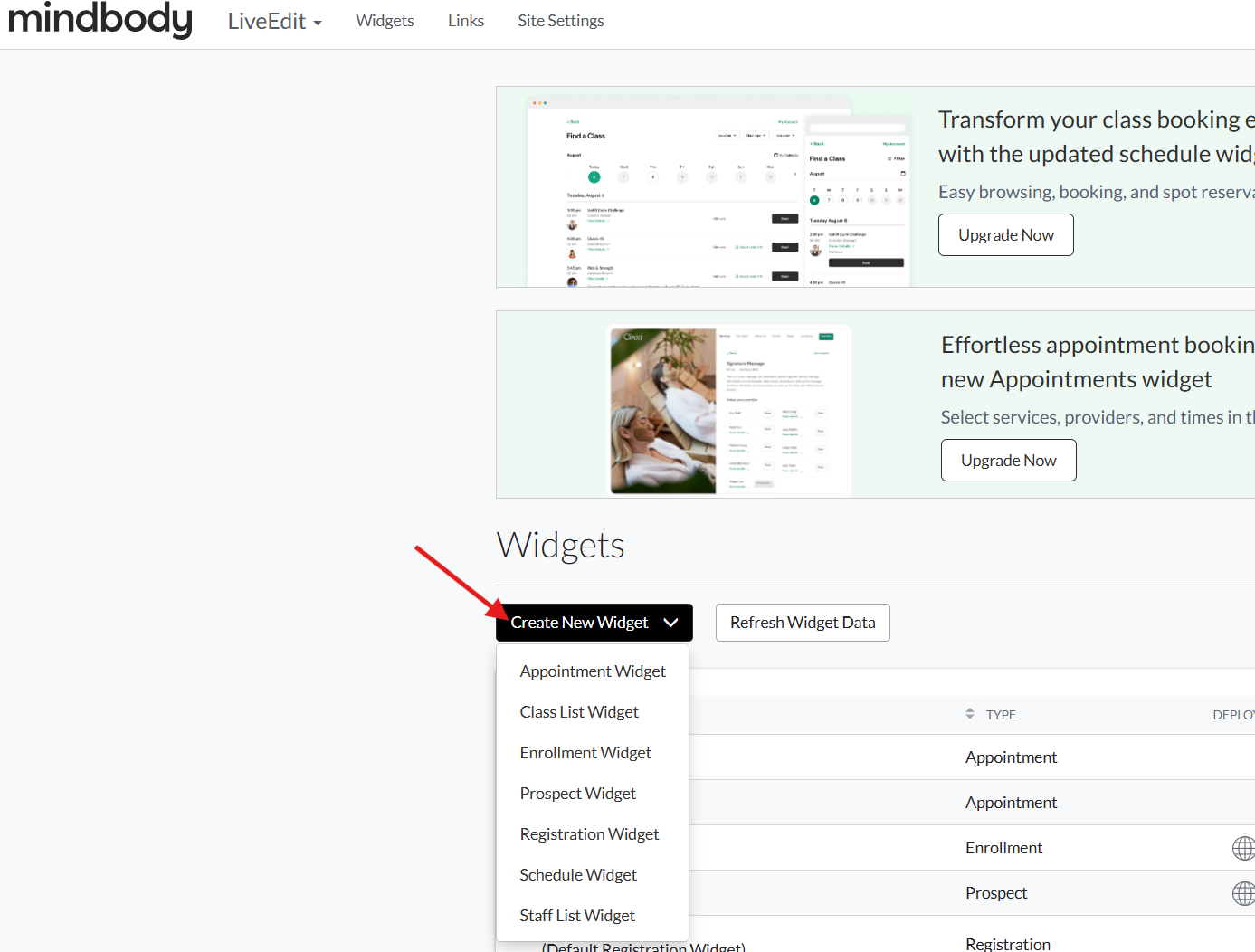
- Adjust your desired Widget Settings on the left-hand panel.
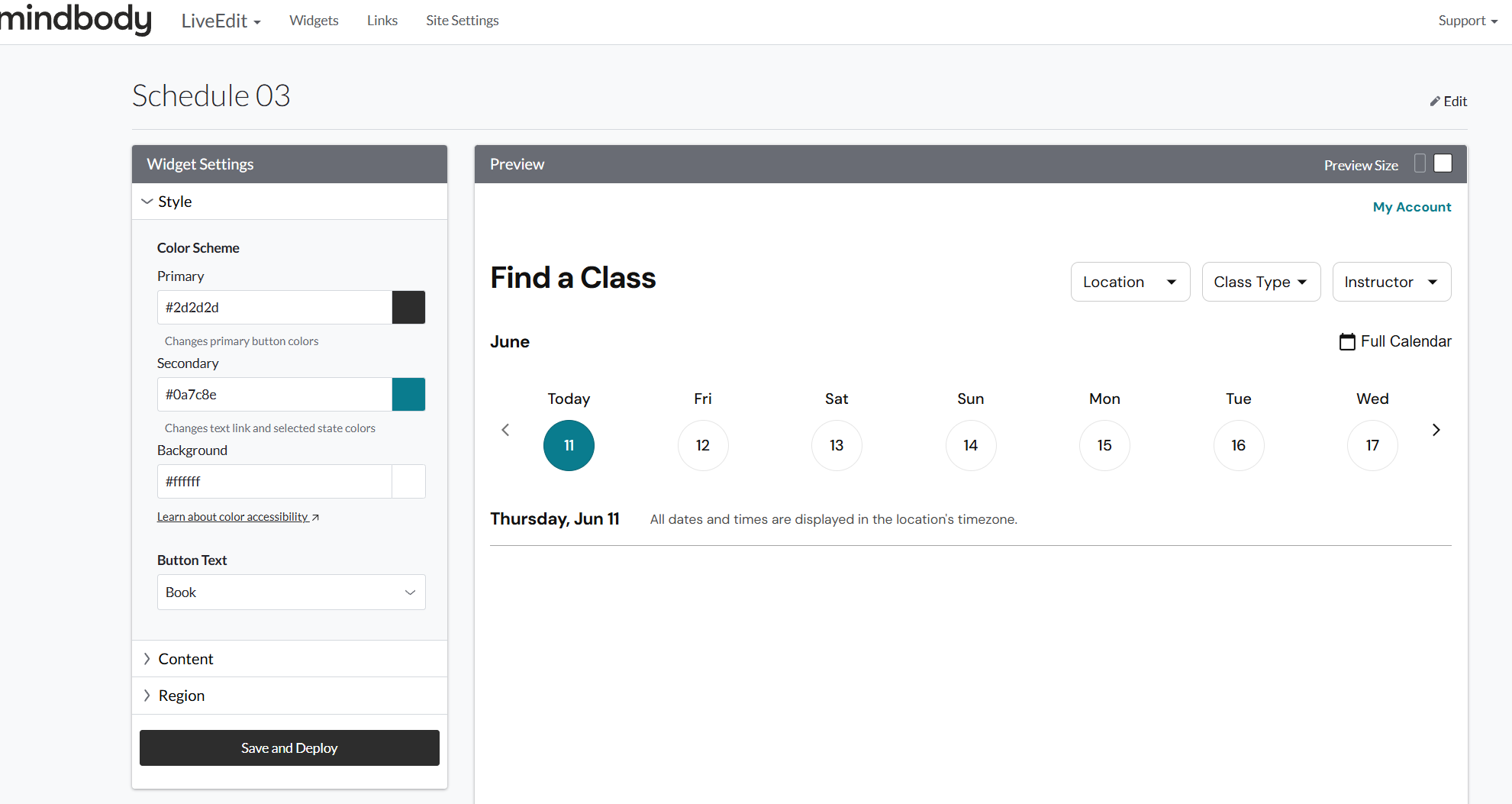
- Once all your settings are good to go, click on Save & Deploy.
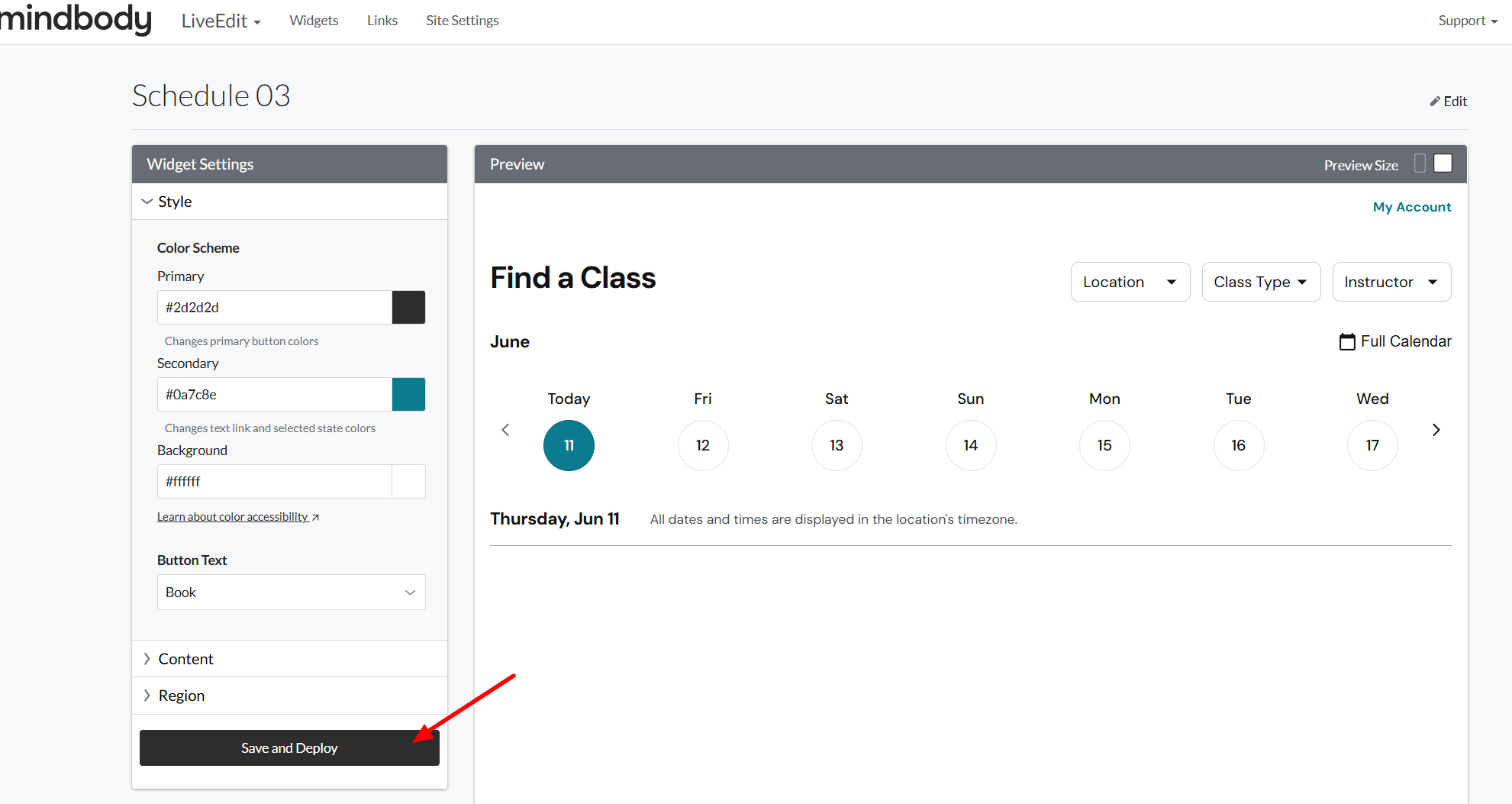
- Copy the provided code snippet.
Installing Branded Web Tool Widgets
- Log in to your liveedit website (How to Login)
- Navigate to the page you wish to add the widget to.
- Click Edit to jump into Edit Mode.
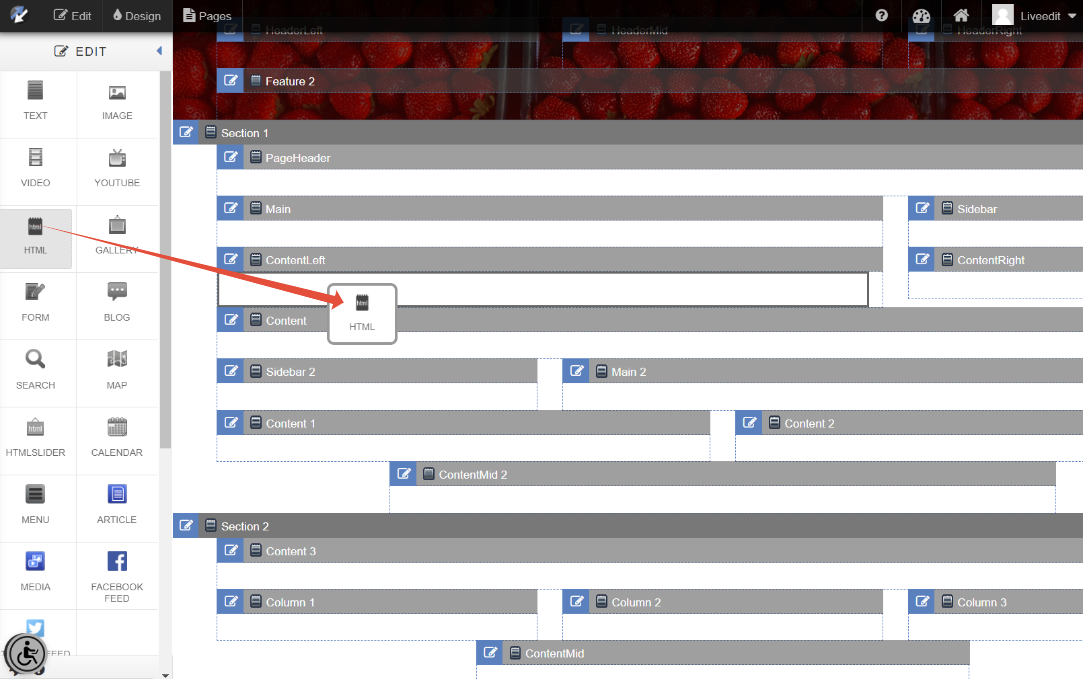
- Drag and drop an HTML Element into a content area.
- Paste your copied code snippet and then click Save Changes to save.
Note: You may need to refresh the page after saving to see the widget load in.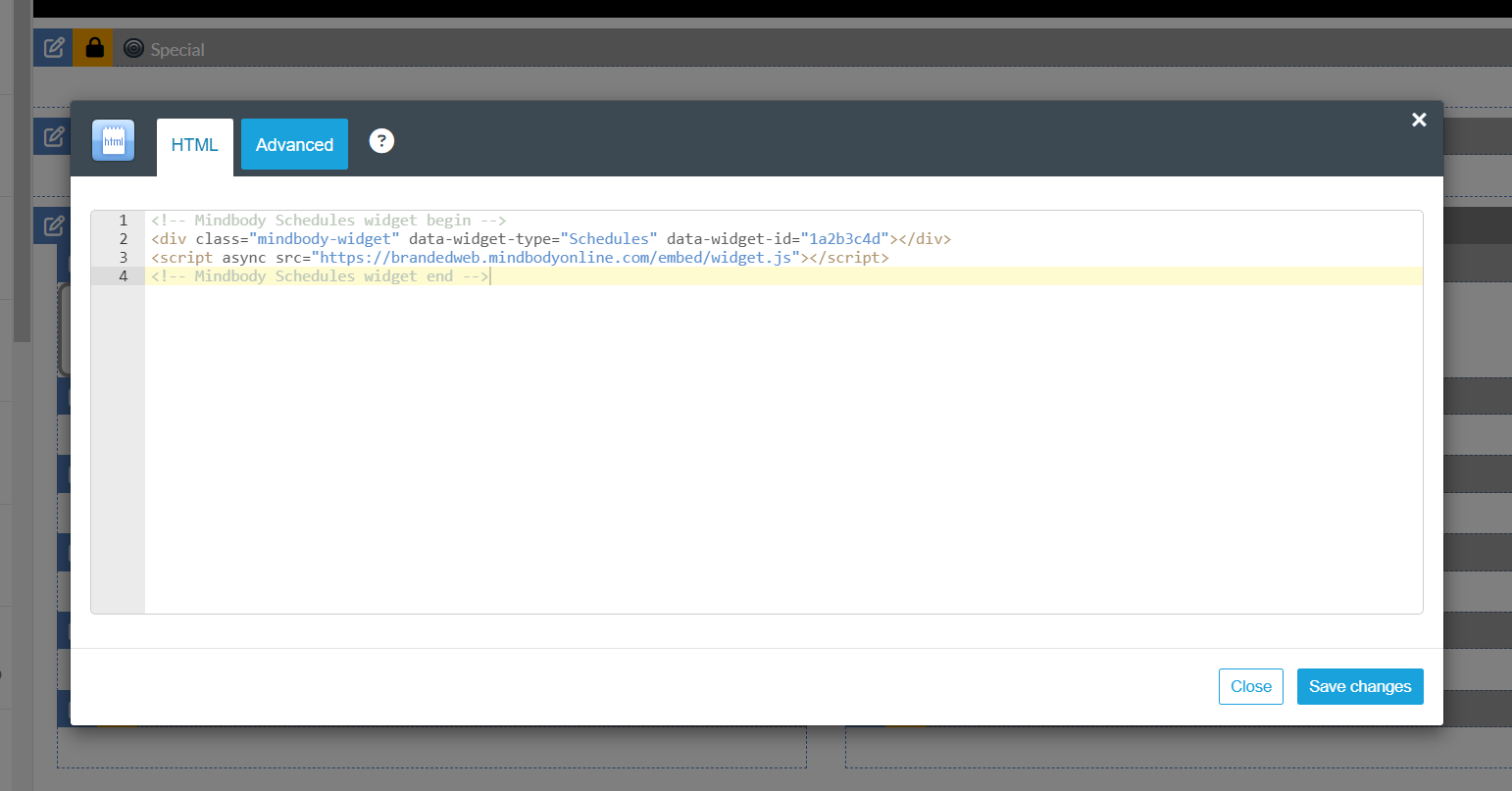
Affected liveedit Mindbody Elements and Integrated Pages
For reference, here's everything liveedit's Mindbody integration provided. All of it ran on API v5, so if your site uses any of the elements or built-in pages below, they'll need to be replaced.
Liveedit's Mindbody Elements:
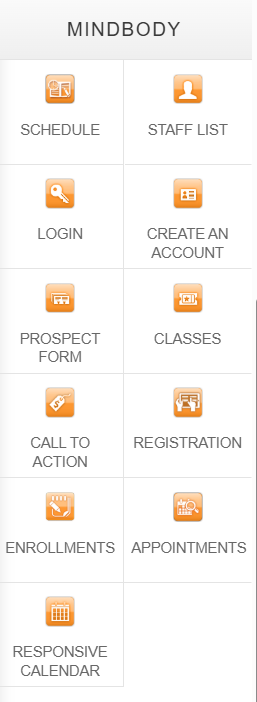
Integrated Pages:
- List Schedule - /apps/mindbody/elements/list-schedule
- Week Schedule - /apps/mindbody/week-schedule
- Enrollments - /apps/mindbody/element/enrollments
- Appointments - /apps/mindbody/appointmentsv2 and /apps/mindbody/appointments
- Login - /apps/mindbody/login
- Logout - /apps/mindbody/logout
- My Account - /apps/mindbody/myaccount
- Staff - /apps/mindbody/staff
- Classes - /apps/mindbody/classes
- Checkout - /apps/mindbody/checkout
FAQ
Can liveedit help me install the Branded Web Tool widgets?
Yes, and we're glad to help you through it. The widgets are created and managed inside your Mindbody Branded Web Tools manager, which only you can access, so while we can't build them for you, we can absolutely guide you through the whole process.
The easiest way is a 50-minute Support Appointment, where a member of our team walks you through it over a Zoom screen share, from creating your widgets to placing the code on your pages. You'll be driving in your Mindbody manager while we guide each step, so just make sure you can log in before the call. Book a Support Appointment.
What features does Mindbody Branded Web Tools support compared to liveedit's custom integration?
Mindbody's Branded Web Tool is based on their newer API (v6), which includes support for parent/family accounts, an improved appointment and class booking experience, contract purchase during a class booking, and much more.
Will my monthly pricing be changing?
Monthly subscriptions will remain the same at this time.
Do you support other integrations besides Mindbody?
Yes! Most popular mindbody alternatives offer widgets or booking links that can be used on your website. For example, WellnessLiving, Mariana Tek, and Momence are some popular alternatives we've seen used over the years.
What will happen with Google Analytics and Meta Pixel tracking for Mindbody?
Branded Web Tools includes dedicated Google Analytics and Meta Pixel tracking features. To learn more, visit Mindbody's guide here: Google Analytics FAQ (branded web tools)