
IINSite is Liveedit's website offer for IIN students and graduates. It includes designs made for health coaches, a built-in Form Builder with pre-built IIN forms, and easy drag-and-drop editing. This guide covers what's included and how to get started with your website.
In This Article:
- IINSite plans
- IINSite design templates
- Forms
- Where should I start?
- How do I edit my website?
- Can I switch design templates?
- How can I sell products, services, or courses?
- How do potential clients contact me?
- Can I send out marketing emails?
- Can I translate my website into a different language?
- Can I have member-protected content?
- Is Liveedit HIPAA compliant?
IINSite plans
- IINSite Brand Builder
- IINSite Growth Essential
Not sure if you're on IINSite or Legacy IIN? See Which IIN Website Plan Am I On?
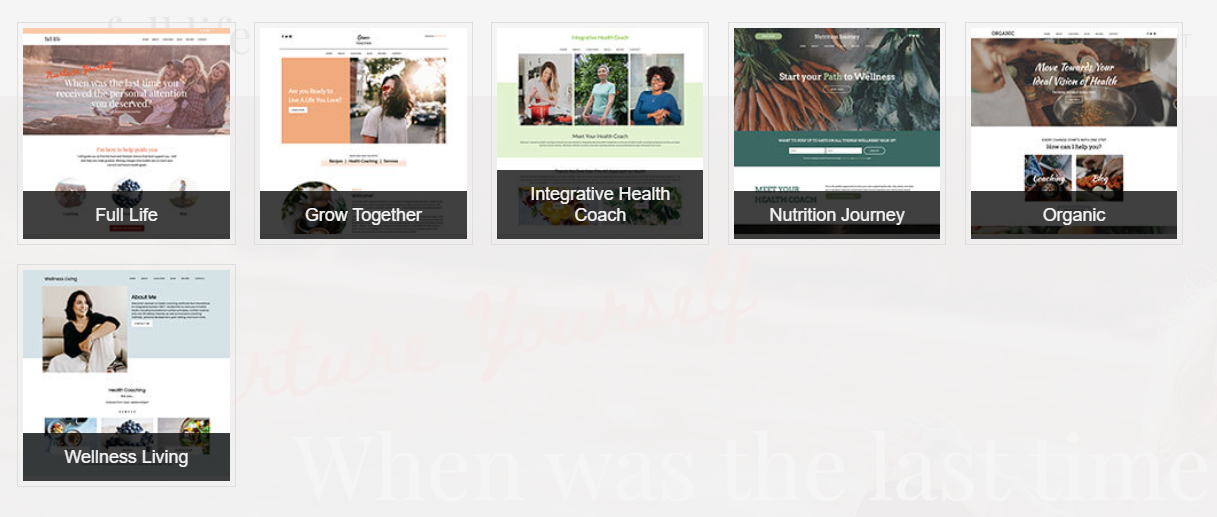
IINSite design templates
- Full Life
- Grow Together
- Integrative Health Coach
- Nutrition Journey
- Organic
- Wellness Living
Forms
IINSite includes a built-in Form Builder. You can build your own forms or start with the pre-built IIN forms. These guides cover the basics:
Where should I start?
Start by thinking about the key parts of your coaching practice you want to highlight. Here's a simple plan to get going:
- Identify your focus. Think about who you help and how. For example, are you focused on weight loss, stress management, or chronic conditions?
- Write your Homepage and About page. Share a few sentences about who you are, who you serve, and what visitors can expect.
- Set up your Coaching page. Decide which offers to feature first, like one-on-one coaching, group programs, or free resources such as a newsletter or guide.
You don't need everything figured out on day one. Start simple and build as you go.
How do I edit my website?
Liveedit uses drag-and-drop editing. You drag Elements into Content Areas to add content, and your changes appear live to visitors right away. These guides cover the basics:
Can I switch design templates?
Yes, you can switch to any IINSite template. Only the layout (content areas) changes. Your existing content stays, and the sample content from the new template isn't added.
Please Note: Default images from every template are already in your website's File Manager, so you don't need to switch templates to use them.
How can I sell products, services, or courses?
Liveedit doesn't have a built-in store, but third-party options like PayPal and Ecwid work great. To learn more, see Store Solutions.
How do potential clients contact me?
Your website comes with a contact form. If you'd like clients to book a specific time with you, you can add a scheduling widget like Acuity Scheduling or Calendly. To learn more, see Appointment Solutions.
Can I send out marketing emails?
Email marketing isn't included, but there are plenty of third-party tools you can use. To learn more, see Email Marketing Solutions.
Can I translate my website into a different language?
The sample content in our templates is in English, but you can write your own content in any language. For a multilingual site where visitors can switch languages, we recommend a translation widget such as Bablic or Weglot.
Can I have member-protected content?
There's no built-in membership feature. You can Password Protect a Page behind a user account unique to your website, but there's no built-in way to take payments for access.
Is Liveedit HIPAA compliant?
No. Liveedit isn't a HIPAA-compliant platform or host.